Daniel Miessler: 4 Reasons to Run Your Own Email Server

Every so often on Twitter, a silly mantra goes around: it’s borderline insane to run your own email server. As Daniel Miessler sums up the case against running your own email server,

Email is complex. It’s hard to secure. Unless you’re the end-all, be-all of email administration, you’re likely to do a far worse job at it than Google, Yahoo!, Comcast, or whoever provides you the service today.

At the time Miessler wrote his response to this argument in 2016, he indicated that he no longer ran his own mail server but had done so for four very good reasons.

  1. It’s hard.
  2. You’re now running an internet-accessible service.
  3. You have more control.
  4. You have more privacy.

I still run my own email server largely for all of these reasons.

I do have to emphasize the first point, however. Running an email server correctly and securely is hard.  Even if you have a good deal of technical skills, you are likely to completely f— something up at least once.

On the other hand, I have occasionally had to talk to people at different companies about configuring email in production systems, and while I did not have the same level of knowledge as the folks working in email every day, my experiences did enable to discuss these issues intelligently.

Configuring SSL On Exim/Dovecot

I ran into a ton of problems recently trying to configure SSL on my server’s Exim/Dovecot services.

To solve them, I relied on the excellent CheckTLS.com to give me detailed information about how my server’s security was failing. I probably wouldn’t have been able to troubleshoot my particular problems without this.

In my case, it turned out to be problems with the intermediate certificate. I tried a number of ways to fix this before stumbling upon an answer that I never would have guessed. I kept grabbing the intermediate certificate from my CA, but no matter what I tried it would not authenticate.

I was able to get it to work, however, by copying the content of the CA cert into the exim.cert file using:


$ echo '' >> /etc/exim.cert
$ cat /etc/exim.cacert >> /etc/exim.cert

Phoneme: A Script to Encrypt All Gmail Archives with PGP

Phoneme is a Python script that will encrypt all of the email sitting in your Gmail account using GPG.

Every time it runs it will skip any messages that already start with “BEGIN PGP MESSAGE” in the body, so you won’t end up repeatedly re-encrypting messages.

A (very) simple script to encrypt all existing email in a gmail account with your gpg keys. The intent is that Phoneme is simple enough that even a layperson ought to be able to tell that there’s nothing suspicious going on with the code and it does what it says on the tin.

Phoneme goes through your email, encrypts it with your public key as the recipient, **DELETES THE PLAINTEXT UNENCRYPTED ORIGINAL** and appends it back to the folder it originally was in with the from and date information intact. It does not however remove the plaintext original from your trash folder, so when the full encryption process has finished you may want to check your trash folder and make sure everything is ok before you hit ‘delete forever’

Death of Email, Episode VII

It seems like someone is constantly proclaiming the death of email as in this GigaOm article about IT firm Atos Origin planning to stop using email in its internal operations.

GigaOm writer Miguel Valdes Faura points to things like social networking and tools like Salesforce’s Chatter as things that are gradually replacing email.

Look, here’s the thing — the beauty of (most) email is that it is based on an open protocol, SMTP. I have email I sent and received in the late 1980s that I can still read on an email client that was just released yesterday, thanks to the wide support for SMTP.

I’ve also had the same email address for 16 years even though I’ve changed email hosts 6 or 7 times during that period. During a small part of those 16 years, my email was hosted at another company, but for most of the time I’ve owned the server that my email domain ran on. Today, it is dirt cheap for anyone to grab a domain name and a hosting account that includes a mail server.

Social networking and similar systems are largely the antithesis of prevailing state of affairs with email. I can use my Google+, Twitter, Facebook and other accounts only because those companies have decided to continue to allow me to — and their Terms of Service make it clear they can change their mind at any moment and cut me off for pretty much any reason.

On the other hand, if I get fed up with one of my social networks, there’s little I can do but close my account and leave. Since all of these companies use proprietary standards, I can’t easily move my Twitter account to Facebook, much less even consider moving either account to my own webserver.

I can (and do) get my data out of these systems, with varying degrees of difficulty, but just having static copies of the data doesn’t come close to replicating my account. Moreover, most of these systems seem to be getting less open. Twitter, for example, used to make it obvious where the RSS feed for your tweets was, but now they hide it like they’re ashamed of it (or, more likely, can’t figure out how to monetize it).

Every time I read someone write about relying on social networking or closed systems, I always think of the BBC’s Domesday Project — an early attempt at creating a digital artifact in which more than a million people participated. But, of course, the Domesday Project is famous in part because the BBC chose to use a proprietary technology that quickly became obsolete and almost rendered the entire project unreadable.

Social networking, as it is currently constituted, is one giant Domesday Project just waiting to happen.
Let Me Frigging Unsubscribe

George Saines hits on a problem that annoys me to no end when it comes to getting off stupid mailing lists and pseudo-spam from legit companies. As he puts it in the title of his blog post, I Want To Unsubscribe, Not “Manage My Preferences”,

But increasingly, I see emails sent from large, respectable companies [1] that provide me with no unsubscribe link. Instead there is an insidious trend towards “Managing Preferences,” which invariably requires a log in, a brief search to find the unsubscribe option, and a form submit. And after all that am I unsubscribed? Apparently not because I keep getting messages. The companies assure that I’m off XY email list while seemingly putting me on ZQW list simultaneously. Perhaps most irritating of all, I am spending an increasing amount of time browsing and checking email from my phone, and elaborate unsubscribe workflows thwart my ability to quickly opt out.

Something else I really hate and get more of is political spam from affiliates of the two major parties in the United States.

For example, last year all I wanted to do was donate a couple hundred dollars to support gay marriage in California. Apparently doing that was an invitation for every fucking Democratic PAC and Steering Committee in the United States to add me to their mailing lists. Thanks, guys — really makes me want to not donate next time around.

World Backup Day – Backing Up Gmail from Windows with MailStore

I’m normally a fanatic about backing things up, but one area I was backsliding a bit was in backing up my GMail account. I tried about a dozen different methods of backing up my account, but none of them worked very well.

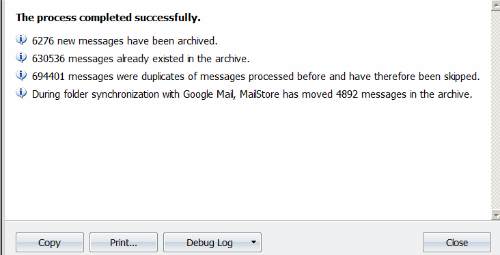
Then I ran across MailStore for Windows. Free for personal, home use, MailStore is the only method I tried that actually backed up all of my 700,000 or so messages in GMail. It wasn’t perfect — I had to run it several times over about a month before it finally was able to grab all 700k messages, but it was far better than anything else I tried.

MailStore stores your messages in its own local database, which works well enough for immediate purposes, but is hardly a long-term solution for archiving email in case of a storage disaster.

Fortunately, MailStore does let the user export all messages to individual .eml files. That takes quite a while with 700k messages, as you might imagine, but once its finished I end up with a directory and subdirectories with each of my email as an individual file that can be accessed in any text editor. I compress that entire directory into a single archive file once a month and throw it on my file server which does have a longstanding system for backups so that now I have multiple versions of all my email in multiple physical locations just in case.

One less thing to worry about.