Frustrations Over Collecting Mattel’s DCUC Line

Phillip Reed recently vented his frustrations at attempting to collect Mattel’s DC Universe Classics line of action figures,

I want to love the DC Universe Classics* series of toys, but too many times the frustration of finding a specific figure is just more than I’m willing to deal with so I basically just ignore the entire line. . . .And time and again Mattel shows a complete lack of concern for the fans — kinda like the Masters of the Universe Classics line — and way too much love for retailers like Wal-Mart.

I think I’ve got every figured from the DCUC line through about Wave 8 when I gave up on it. I’ll still occasionally  by figures I happen across, but trying to get a complete set of even a single wave is becoming ridiculously hard and expensive.

But as one of the commenters to Reed’s story notes, a big part of the problem is the sheer popularity of the DCUC line. Bottom line is that if the Toys-R-Us near me puts a new case of figures out overnight, by 5 p.m. the next day most of the figures in that case are bought and already listed on EBay.

My local comic book store always gets a small number of action figures that also show up in mass retail chains, and usually there’s a 40-50% markup at the comic store as compared to the mass retailers. On DCUC, however, I’ve seen figures marked up 200 to 300 percent immediately — that’s not the store being greedy, but rather a recognition that this is what the market price for this figures really is. If they put them at MSRP they’ll be gone in a day and up on EBay.

For the most part, if I really want a DCUC figure these days I’ll just preorder online. Otherwise, I just don’t worry about it anymore.
TrueCrypt 7.0

In July, TrueCrypt 7.0 was released which includes hardware acceleration for AES, assuming you have one of the supported Intel processors, and support for automatic mounting of encrypted volumes,

A volume can now be configured to be automatically mounted whenever its host device gets connected to the computer (provided that the correct password and/or keyfiles are supplied).  (Windows)

Note: For example, if you have a TrueCrypt container on a USB flash drive and you want to configure TrueCrypt to mount it automatically whenever you insert the USB flash drive into the USB port, follow these steps: 1. Mount the volume. 2. Right-click the mounted volume in the drive list in the main TrueCrypt window and select ‘Add to Favorites‘. 3. The Favorites Organizer window should appear. In it, enable the option ‘Mount selected volume when its host device gets connected‘ and click OK.

Also note that TrueCrypt will not prompt you for a password if you have enabled caching of the pre-boot authentication password (Settings > ‘System Encryption‘) and the volume uses the same password as the system partition/drive. The same applies to cached non-system volume passwords.

That is very cool. I use TrueCrypt for WDE on all of my laptops, and then also encrypt any Flash drives or external USB hard drives using the same passphrase I use on the WDE drives. I assume (though am not an expert on cryptography so I could be wrong) that this probably increases the risk that someone could guess or compromise my passphrase. On the other hand, I’m just trying to protect myself against snoopy passers-by and the worst case scenario where a drive or laptop is lost or stolen. I’m prepared to concede the NSA is probably going to pwn my drives if they really want to.

Enabling pre-boot authentication and then auto mounting drives that use that passphrase is a nice addition to the system.

ManicTime

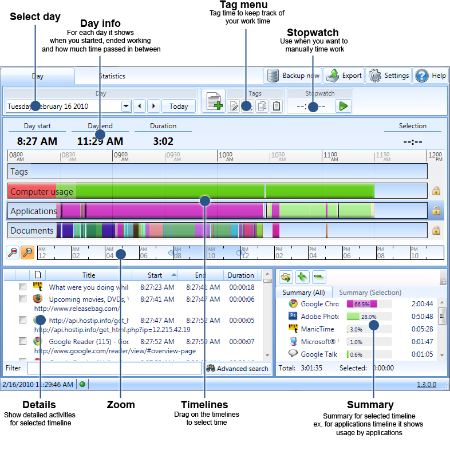
ManicTime is a software package for Windows that bill itself as a time management program. It tracks and logs pretty much everything that you do on your computer, and then aggregates that in a timeline format, application-based format (how many minutes per week do you spend in Firefox vs. Word, for example). As ManicTime’s creators describe it on the website,

Auto tracking of computer usage – Manictime sits in the background and records your activities, so you can just forget it is there and focus on your work. When you are finished you can use collected data to accurately keep track of your time.

Keep track of your work hours – After you have finished working, you can use MT to keep track of your hours. That means no more “punch-clock” like software, where you always forget to start or stop the clock. Just sit back and do your work. After you are finished, you can easily use collected data to accurately keep track of your time.

Again, I’m not so interested in the software for the time management/billing aspects as I am of the incredibly detailed activity stream it creates in its database (see the screenshot below). I’ve got it installed on every computer I use, and it produces a permanent record of everything I’ve done on those machines — how much time I really spent playing World of Warcraft; every website I visited and for how long; the subject line of emails and how long I spent reading them, etc.

This is like crack for those of us who obsess over activity streams and self-tracking. It uses an SQL variant database to store data, so it is relatively easy to get the data out for repurposing elsewhere (I’d import it all into the WordPress lifestream I’ve got going, except a lot of the data is private in the “hell on, I don’t want that on the Internet quite yet.”)

ManicTime comes in both a free version and a commercial version that goes for $67. The free version works fine for what I do; the commercial version makes backups and a few things related to the billing/timesheet aspect of the program easier to manage.

Simplenote

I first gave Simplenote a whirl after reading Adam Pash’s fanboy-esque paen to the service at Lifehacker, The Holy Grail of Ubiquitous Plain-Text Capture. Simplenote does pretty much just one thing, but it does in incredibly well — it lets you create and manage text files and sync those across multiple platforms. As Pash wrote,

What works best for me may not be what works best for you. A lot of people prefer applications like Evernote, which lets you capture nearly any form of text or media you want and is accessible via the web, desktop applications, and smartphone apps. Personally, Evernote’s a bit too large (and sometimes too bloated) for my taste. All I’ve ever wanted is the ability to create plain text files on my computer, sync those files to my phone and other computers (without any extra effort on my part), and the ability to edit or create new files from any of those buckets. That’s what I describe below.

And Simplenote does the above almost flawlessly. There are clients for it for Mac, Windows, iPhone, Android, Linux and maybe even the BeOS for all I know. I typically create a number of set text files from templates each morning on my Windows laptop and then update that throughout the day from whatever device I have closest, usually my Nexus one. The various clients sync with the Simplenote online service, and the result is, as Pash emphasizes, text capture becomes ubiquitous and easy.

Which is not to say the client software is all made equal. One thing I wish the clients would add would be a basic “insert timestamp” option. I use a text expander software fto handle that with Windows-based ResophNotes client, but I’m not aware of how to accomplish automatically inserting a timestamp in any of the Android clients.

On the other hand the Android client I use, AndroNoter, has a convenient “Email” button which lets me email the content of a textfile to whatever email address I want. That works for me because I use Simplenote mostly for files that I’m still editing and then forward the finished file to one of my Gmail accounts for archiving.

Simplenote is free, but for $8.99/year there is a premium version that, among other things, eliminates all adds, provides automatic backups, and lets you forward emails to Simplenote to create text files that way if you’d prefer.

Simplenote has become one of those tools I use so frequently it has just become a background process in everything I do throughout the day.

WordPress-Based Activity Streams with FeedWordPress

One of my many obsessions is with activity streams — collecting the little bits of information we leave all over the web and organizing it into something a bit more useful. I used to use Sweetcron for that on this website but a) Sweetcron has largely been abandoned and efforts to fork and update it have largely failed, and b) I really wanted something that would work within a WordPress install, especially with the new multi-site capability built-in to WordPress.

The solution is the FeedWordPress plugin. Essentially, FeedWordPress is just an RSS/Atom aggregator. You give it RSS/Atom feed URLs and then set up a cron job to call the update function. After that, it goes through on a regular basis reading the feeds and adding new entries to WordPress as posts.

You can see the result on my lifestream subsite. I’ve got FeedWordPress checking about 40 different RSS feeds and then adding each new item as a separate post. FeedWordPress makes it trivial to do things like automatically tag posts, so I can easily drill down and look at just my main World of Warcraft character’s stream.

FeedWordPress does pretty much everything I wanted a lifestream app to do.