Nice t-shirt with the Earth Defense Force logo from Godzilla Final Wars:

Month: November 2011
Hash It! for Android
Hash It! is an Android app that replicates — and is compatible with — the Password Hasher extensions for Google Chrome and Firefox. Create a master password key, and Hash It! generates a password for each site you visit based on the master password and the URL of the site.
An interesting approach to password management, though I’m sticking with Diceware plus KeePass.
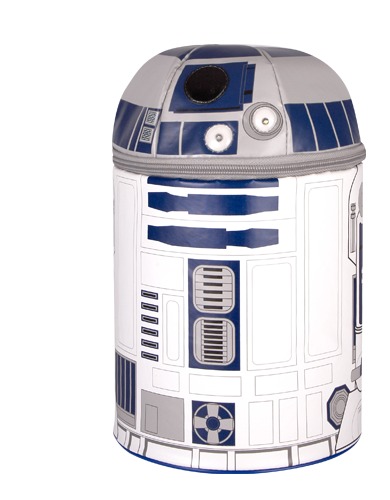
R2D2 Thermos Lunch Kit
Awesome R2D2 Thermos “lunch kit”:
Holy Musical, Batman!
Back in 1998, Warner Bros. announced that Batman: The Musical would open on Broadway in 2001. Thankfully, the musical never saw the light of day. The Dark Knight of the Soul website has pretty much every piece of scrap of information there is about what might have been.
SpiderOak — Like Dropbox, Except They Don’t Lie to You
I’m not a fan of Dropbox ever since it was clear they had deceived customers. I work on a freelance project where everyone uses Dropbox (after I go them hooked on it), and giving it up for that isn’t really an option. For everything else I was using Dropbox for, however, I long ago removed all of my files off their service.
Instead I’m using SpiderOak. Like Dropbox, SpiderOak is intended as tool to backup files to the cloud and then sync those files with other computers and devices such as smart phones.
What SpiderOak has that Dropbox doesn’t is the option for genuine encryption — my SpiderOak account is set up so that nobody, including SpiderOak employees, can access my files without my password. Dropbox promised users this capability, but it turned out they were not telling the truth and their employees could access user files at any time (or accidentally expose them for a couple hours to the entire Internet as they did earlier this year).
Of course with great power comes great complexity, and this is the major downside to SpiderOak. Dropbox is dead simple to install and use — it took me no time at all to get people who barely understood how to use their computer to install and use Dropbox with no problem. SpiderOak, on the other hand, requires a lot more thinking about what you’re doing.
So in SpiderOak, first you have to create a Backup set (for example, all files in a directory), and then the application backs that up. Then you need to go in and sync the backup, authorizing specific devices and/or specific directories or files. Don’t get me wrong — it is not that SpiderOak is obsessively complex, but rather that it is just not drop dead simple like Dropbox is.
On the other hand, SpiderOak is much cheaper than Dropbox — I’m currently paying $10/month for 100gb of space (and, like Dropbox, there is a free account with a 2gb limit).
The only other thing I’d add is that I think the Dropbox app for Android is crap. the SpiderOak app wasn’t much better until recently, but the latest version does a nice job of letting me pick and choose which files, directories, etc. I want my phone to keep in sync.
Firefox for Android to Implement Native UI
So Firefox on Android is going to go native with its user interface:
The problem, however, is that interpreting and painting at the application level adds an unwanted overhead, which usually goes unnoticed on most modern desktop and laptop computers, but becomes a bottleneck in resource constrained devices like cell phones and tablets. Native widgets are handled by Android directly so it doesn’t require additional translation or memory to map how to draw them.
Faster startup, less memory consumption, and improved responsiveness are some of the expected benefits of such a move,which is not free of important new challenges, most notably: localization and add-ons support, both of which are completely XUL-oriented.
I like the Firefox browser on Android, but it crashes and randomly restarts so often, it is essentially unusable for me. Hopefully this planned change will actually make the browser useful.