Simple Facebook Connect is a plugin for WordPress that promises to make it easy to enable Facebook Connect on a WordPress install.
Tag: Wordpress
Custom Sidebars Plugin for WordPress
The Custom Sidebars Plugin for WordPress does exactly what it says — it allows the user to set up different sidebars that appear based on the context of the page being displayed. For example, set up a custom post type and then assign a sidebar that appears only on posts of that type.
Gravatar Hovercards Plugin for WordPress
Back in October, WordPress.Com implemented Gravatar Hovercards — wherever you would see a Gravatar you could mouse over the image and a small image would pop out showing details from the person’s Gravatar profile. For example, here’s what the Hovercard for my Gravatar profile looks like,
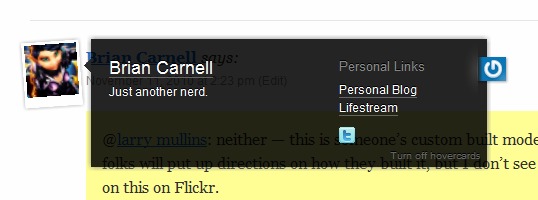
The Gravatar Hovercards plugin for WordPress now enables this feature for self-hosted installs of WordPress.
Editorial Calendar Plugin for WordPress
Edit Calendar is a plugin for WordPress that makes it much easier to manage and keep track of posts scheduled to be published in the future. The video below does an excellent job of illustrating what the plugin does and why you probably want it.
The WordPress Editorial Calendar Screen Cast from Zack Grossbart on Vimeo.
Add Linked Images To Gallery WordPress Plugin
Add Linked Images to Gallery is a WordPress plugin that I suspect has a fairly limited number of uses given the very specific nature of what it does, but if you are one of those folks who need this, it is a lifesaver.
The plugin will scan the IMG tag on new posts looking for links to graphic files that are on other sites. When it finds them, it will automagically grab the external file, add it to the WordPress Gallery for that post, and then change the link so that it references the locally stored file.
Why would you possibly want to use this? Well, I’m using it on my lifestream so that the occasional graphic that is sent along from feeds like StumbleUpon or Gdgt are stored locally so I don’t have to depend on those sites staying in business in order for the graphic to appear on my site.
The developer of the plugin uses it to automatically copy images uploaded from his iPhone to Flickr in WordPress posts he makes from there (as I said, the use cases here probably aren’t very common).
The one thing the plugin doesn’t do at the moment is allow an admin to go back and retroactively apply this methodology to existing posts, but that is a feature the plugin’s developer is working on.
Post Revision Display
Post Revision Display is a WordPress plugin created by D’Arcy Norman at the instigation of Scott Rosenberg who wanted a way to publicly display any revisions made to a post after publication. The plugin does just that, adding no-index/no-follow metatags in the revisions so that Google and other search engines don’t end up indexing the revisions as well.