FreeFileSync

Update – November 11, 2014

Until recently I regularly used and wholeheartedly endorsed FreeFileSync. Recently, however, the developers have bundled the software with browser hijacking malware that installs itself when you attempt to install the software. As such, I no longer use or recommend FreeFileSync.


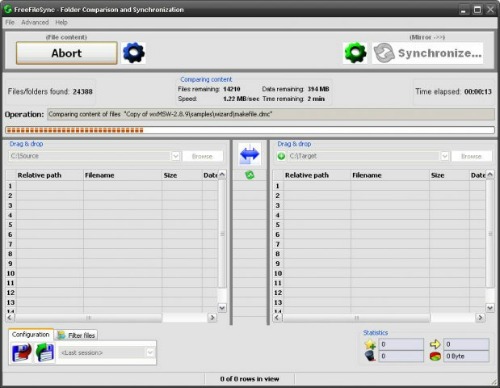
FreeFileSync is a free and open source tool for syncing directories and files. I use it primarily to mirror my main personal data drive — which clocks in at about 3 million files in 1.1 terabytes —  to a local backup.

In the past, I’ve actually paid for commercial sync tools and this blows them all away. It tears through the compare and sync very quickly, and is extremely configurable if you want to go beyond simple mirroring.

I rely on this daily, and the best praise I can give it is that I just hit the Synchronize button and forget about it.


World Backup Day – Backing Up Gmail from Windows with MailStore

I’m normally a fanatic about backing things up, but one area I was backsliding a bit was in backing up my GMail account. I tried about a dozen different methods of backing up my account, but none of them worked very well.

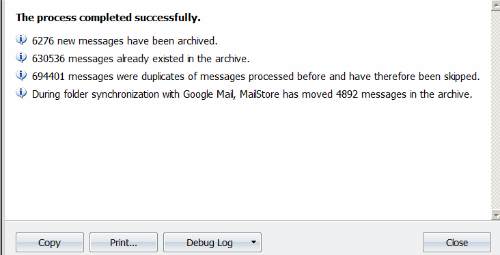
Then I ran across MailStore for Windows. Free for personal, home use, MailStore is the only method I tried that actually backed up all of my 700,000 or so messages in GMail. It wasn’t perfect — I had to run it several times over about a month before it finally was able to grab all 700k messages, but it was far better than anything else I tried.

MailStore stores your messages in its own local database, which works well enough for immediate purposes, but is hardly a long-term solution for archiving email in case of a storage disaster.

Fortunately, MailStore does let the user export all messages to individual .eml files. That takes quite a while with 700k messages, as you might imagine, but once its finished I end up with a directory and subdirectories with each of my email as an individual file that can be accessed in any text editor. I compress that entire directory into a single archive file once a month and throw it on my file server which does have a longstanding system for backups so that now I have multiple versions of all my email in multiple physical locations just in case.

One less thing to worry about.

HP Shuts Down Its Online Backup Service

I’m a big fan of online backup of critical data — I use Amazon S3 to back up the 300gb or so of personal files I couldn’t bear to lose — but as these sort of sites proliferate, you have to be careful to pick one that’s going to be around for awhile. Case in point HP announced it is shutting down its HP Upline service. I’m not too familiar with this service, but I assume it is similar to the program that Dell and other computer manufacturers have these days where they try to upsell consumers an online backup system when they’re purchasing their desktop or laptop.

According to a press release via Web Worker Daily,

HP continually evaluates product lines and has decided to discontinue the HP Upline service on March 31, 2009.

HP will no longer be backing up your files to the HP Upline servers as of Feb 26, 2009 at 8 am Pacific time. HP will keep the file restore feature of the Upline service operational through March 31, 2009 Pacific time in order for you to download any files you have backed up to Upline.

If you have a paid subscription to HP Upline, you will be refunded the full amount of the fees you paid for the service. That refund will be credited to the credit card account or PayPal account that you used to subscribe to the Upline service. If you do not receive the refund prior to March 31, 2009, please contact our customer service team at https://www.upline.com/support/email.aspx.

HP looks forward to offering you additional technology products and services in the future.

Frankly, that’s a relatively short time frame for making copies of anything on their servers. Some of us are fortunate to have 20mb download through our ISPs, but not everyone does and intensive users of the service might find that is a cutting it close (along with the hassle of suddenly having to devote a good portion of time to the attendant issues in creating the restore volume, etc., etc.)

And if HP couldn’t make this service work (which doesn’t surprise me), how do you think those services offering unlimited storage for $5/month are going to be doing 6 months from now?

Online backup is definitely a useful tool to have, but it shouldn’t be used as the only backup method and you have to consider how likely it is the company hosting your data will still want to/be able to in the short and long terms.

Magnolia Loses All User Data

Personally, this is why I run my own web services using open source packages rather than trust free services for long-term storage of information (short-term usage is inevitable, but get that stuff off and onto a server you control and ensure it can be backed up ASAP).

The social bookmarking service Ma.gnolia reports that all of its user data was irretrievably lost in the Jan. 30 database crash that knocked the service offline. That means that users who were unable to recover their bookmarks through publicly available tools (including other social media sites and the Google cache) have lost all their data.

. . .

It turns out that Ma.gnolia was pretty much a one-man operation, running on two Mac OS X servers and four Mac minis. A clear lesson for users is not to assume that online services have lots of staff, lots of servers and professional backups, and to keep your own copies of your data, especially on free services.

Cheap Online Backups

Photojojo is usually a pretty interesting photo-related site/blog, but they had me shaking their head with their effusive recommendation of Backblaze for computer backup,

Backblaze is the best online backup tool we’ve ever used.

Why we love it:

  • No DVDs, no hard drives to mess with
  • Backups happen invisibly as soon as files are added
  • $5/month, no matter how big your hard drive
  • Won’t slow down your computer. Really.
  • Your online backup can’t be lost or stolen
  • Download your backed up files anytime (of course) or have them overnighted to you on DVDs or a hard drive (spiffy!)

Sigh. Okay, here’s the deal — if you really think these service that offer unlimited data backup for ridiculously low prices are sustainable, you might as well go all the way and send your life savings to Bernie Madoff for those consistent 8-10 percent annual returns.

And, no, I’m not suggesting Backblaze or other services like it are fraudulent. In fact I give Backblaze credit because they are very upfront about their business model,

How Can You Backup Everything Online For Just $5 per Month?
We have developed a highly efficient storage system that enables us to optimize how we store data. And we’re counting on some people having a lot of data and others not very much, but that it will work out on average.

Backblaze also has some interesting upselling options including offering to send users DVDs and hard drive backups of their data which is a very nice option to have.

Who knows, it could work out for them. But this is an extremely crowded space at the moment and we’re presumably talking about extremely important files. I’m not sure I’d want to count on a service that’s counting on a certain usage pattern and that is competing against any number of firms counting on exactly the same thing.

Personally I think asking “what’s the cheapest online backup option” is not a good way to think about backups. Rather, I’d start by imagining all of your data has been wiped out today — how much would you be willing to pay to recover that data? Then discount that price over time based on your income and other backup options you’re using.

Maybe ultimately backing up all your data is really only worth $5/month. If so, Backblaze certainly seem like an interesting service to explore. Otherwise, I’d look elsewhere (I’m using an Amazon S3-based system, but the caveat is I pay $50-$60/month for the 300+gb I’ve got stored there).
BQBackup.Com

Okay, I’m a  little paranoid about losing data (or as my wife puts it, pain-in-the-ass OCD). So as the data on this server has grown to 20+gigabytes, its been a challenge figuring out how to back it up in case of a failure at the data center, and also how to capture regular snapshots.

The current scheme is this. First I signed up with BQBackup.Com which is a New York-based company that specializes in hosting for online backups. $20/month buys 100gb of storage.

Second, I set up an rsync job in crontab so that every morning at 4 a.m. rsync starts on the server and syncs with my BQBackup site.

Finally, I installed Linux on my MSI Wind and created a couple of cron jobs that at 6 a.m. download the MySql databases from the main server, then rsync with the BQBackup site, and finally write the resulting 20gb to a year-month-day.tar.gz file. Throw those on a  hard drive and store at an undisclosed location offsite.

And just in case that all fails, the files on the MSI Wind get backed up to Jungle Disk along with the other 300gb or so of personal data I really can’t afford to lose.