Add Linked Images To Gallery WordPress Plugin

Add Linked Images to Gallery is a WordPress plugin that I suspect has a fairly limited number of uses given the very specific nature of what it does, but if you are one of those folks who need this, it is a lifesaver.

The plugin will scan the IMG tag on new posts looking for links to graphic files that are on other sites. When it finds them, it will automagically grab the external file, add it to the WordPress Gallery for that post, and then change the link so that it references the locally stored file.

Why would you possibly want to use this? Well, I’m using it on my lifestream so that the occasional graphic that is sent along from feeds like StumbleUpon or Gdgt are stored locally so I don’t have to depend on those sites staying in business in order for the graphic to appear on my site.

The developer of the plugin uses it to automatically copy images uploaded from his iPhone to Flickr in WordPress posts he makes from there (as I said, the use cases here probably aren’t very common).

The one thing the plugin doesn’t do at the moment is allow an admin to go back and retroactively apply this methodology to existing posts, but that is a feature the plugin’s developer is working on.
Self-Tracking Apps for Android

I’ve been using Zealogs.com to do a lot of self-tracking (seriously — I track several dozen different daily variables from weight to blood pressure, etc), but recently decided for a number of reasons it would be better to do my tracking locally on my Android.

So, off I went to the Marketplace and after installing and uninstalling a number of apps settled on two to handle my tracking needs.

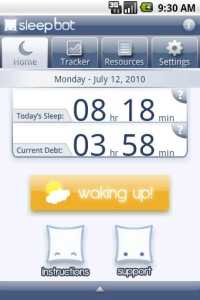
First I added Sleep Bot Tracker Log which, as the name suggests, only tracks one thing — how much sleep I’m getting every night. It is a really well-done app, especially considering its free. Press a widget when you go to sleep, and then again when you wake up, and it tracks and graphs how much sleep you’re getting. Noting when I go to sleep and wake up has always been something I thought was a pain, and this makes it trivially easy (plus I hate having to do the math on how much time I slept if I went to bed at 10:17 p.m. and woke up at 6:03 a.m.)

Second, for everything else, I settled on Zagalaga’s KeepTrack. KeepTrack lets me do almost everything I was doing on Zealogs. It lets me create what it calls a “Watch” which is anything I want to keep track of, and then gives me the option of tracking it as a number, a yes/no flag, or as a text field. It can then chart the values I enter over time and export as a text file or XML.

The only thing I wish KeepTrack had was the ability to add text notes to numerical and yes/no types. For example, if I enter 22,000 as the value in my Steps tracker, I’d like to be able to note what I did that day that resulted in me walking so far above my normal average.

Otherwise, KeepTrack does exactly what I wanted and, like Sleep Bot, is free.