James Lileks on Hamas

The local paper ran James Lileks’ op-ed about Hamas’ announcement it had abandoned the terms of the truce with Israel. Lileks opens his op-ed with this bit,

“Hamas Abandons Truce After Israeli Strike” read the Yahoo headline on the Associated press story. A reasonable reaction. Hamas had just been pushed too far. They send out a holy man to blow up a bus, and Israel has the temerity to kill some architects of the plot. You can understand Hamas’ position: How can you talk to such hotheads? How do you deal with people who think dead Jews count?

Anti-War Protest — God Forgive Them!

These are pictures I took at an Aug. 12, 2003 anti-war protest. Here’s a basic
crowd shot. There are a few more people off to the left of the frame:
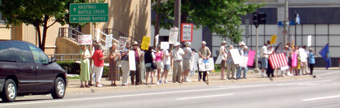
These are all pretty generic statements,

“Work for peace” – “A veteran for peace” – “They lied
to us” – “No more wars”

One of the things these folks could use is the font police. If I can’t make
out clearly what this guy on the end is saying while standing stationery across
the street, it’s not likely many of the cars whizzing buy were able to read
it either.

This guy chose to go for the odd, cryptic statement: “War is the escape
from the problems of peace.” In relationship to Iraq, I’m not sure how
anyone could possibly consider life under a military dictatorship to constitute
a condition of peace (unless you endorse the CounterProtest.Org folks’ satirical
view that Hussein wasn’t a problem because he only killed Iraqi civilians).
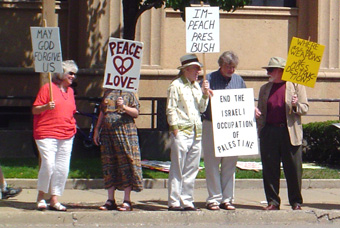
From left, “May God forgive us.” Really, I don’t agree with you about
the war, but I don’t think you need to ask God’s forgiveness for protesting.
That’s going a bit too far.

A generic “Peace/Love” followed with “Impeach Pres. Bush”
and the ubiquitous “End the Israeli Occupation of Palestine” (apparently
suicide bombing is not an escape from the problems of peace, as you won’t
find any signs condemning that sort of violence among all of the pro-Palestinian
signs).

And, of course, the $64,000 question — “Where are the weapons of mass
destruction?”
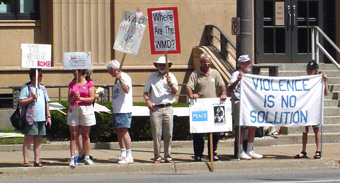
Okay, I have to admit I thought this slogna was clever. “Think outside
the bomb”

Woman next to him is holding an extremely small sign with something about “Christ’s
message.” Whatever it was, I can guarantee you no one else who saw this
protest was able to read it either.

The guy next to her wants everyone to know that, “War hurts us all”
(but, of course, it really hurt Uday and Qusay. I suppose life wasn’t really
worth living if you can’t feed people to wild animals anyway).

In case you missed the first sign, the next guy wants to know “Where are
the WMDs?”

And next to him a picture of the Arab women with the caption, “Are you
willing to kill her?” Well, Saddam & Sons certainly were willing to
if it would further their hold on power. But then granting those folks moral
consideration would have been trying to escape from the problems of peace.

The big banner says “Violence is no solution”, which of course is
obviously wrong. Violence is often the only viable solution available.
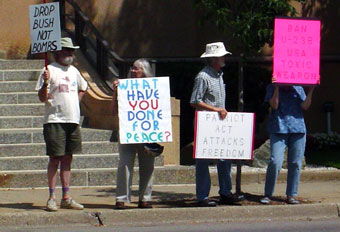
“Drop Bush not bombs” — well, you’ll get a shot at that in a bit
over a year.

“What have you done for peace?” — well, I supported a war that got
rid of a brutal dictator. I know that doesn’t quite beat hanging on a street
corner with a sign, but I’m getting there.

“Patriot Act attacks freedom” — yep. Both it and Ashcroft need to
go.

“Ban U-238 USA Toxic Weapon” — this woman’s repeating the Left’s
nonsense about depleted uranium.
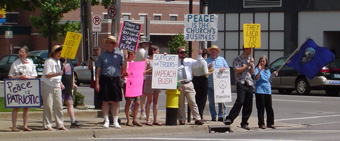
From left to right, “Peace is patriotic.” God, I always hate all
that flag waving and appeals to patriotism. 🙂

Next to her is the crowd favorite “they lied to us” which also shows
up at the end.

The guy next to her tells us “There is something you can do – Stand for
peace.”

The woman next to him has some takeof on “Mother Against . . .” but
the handwritten letters are hard to decipher.

Next we have “support our troops, impeach Bush,” followed by my favorite
of the bunch, “Peace is the church’s business.” Whoa. Hold up there,
pardner. You might want to better familiarize yourself with the history of organized
religion before making that sort of claim.

And finally the all-important, “End the military occupation of Palestine.”
Hmmm . . . would you kill this
woman
?

BlogExpress

I’ve complained several times that the current RSS aggregator I’m using — Radio Userland — doesn’t have any way to categorize the dozens of RSS feeds I’m monitoring and, unfortunately, what looks like the aggregator with the featureset I want is only available on the Macintosh.

The upside is that people seem to be developing new RSS aggregators right and left so there are plenty of ones to choose from that come close to what I want. The best I’ve come across so far for Windows is BlogExpress which has the advantage of also being free (with a donation suggested).

BlogExpress is almost perfect. It is built on top of Internet Explorer and lets me do most of what I want — I can create categories and subcategories for the various RSS feeds I’m subscribed to. It can give me a category level look at how many new items there are on each RSS feed, but alas it cannot yet aggregate all of the feeds under, say, the Africa category, and simply show me in one page all of the new stories in all of the RSS feeds I’ve tagged as being about Africa. That’s what I’m really after.

BlogExpress uses a tabbed interface much like Mozilla, so new stories I click on in the aggregator pane show up as new tabs. Works great, but I’m spoiled by Firebird’s ability to background load new tabs which I find a much better way of opening new tabs, especially when I’m going through a list of 20-30 stories I might want to open.

ActiveWords + Conversant

Last year I wrote about ActiveWords, which is hands down one of the best Windows utilities I’ve ever used. ActiveWords makes it easy to trigger relatively complex sequences of events just by typing a keyword into any text entry box.

I mostly use it to handle many of the repetitive tasks that are involved in maintaining my Conversant-based web sites. Conversant itself is pretty straightforward, but I’ve got so many different things going on — and a tendency to do things the hard way — that ActiveWords offers an excellent interface for many of these procedures.

Here’s a basic example. I’ve got close to 1,500 topical pages. Each of those topical pages has an associated RSS feed and features an XML icon with a link to the RSS feed. Each topical page has a hidden field that has the location of the RSS feed (there is an easier way to do this, but like I said, I like to be difficult). So whenever I create a new topical page I simply plant the cursor in the text entry box for the RSS field, type "RSS" followed by the F8 key which runs this basic text substitution script, (the greater than and less than signs are represented by the GT and LT tags).

<lt>!–#siteurl–<gt>index/rss/channel/

which would output:

<!–#siteurl–>index/rss/channel/

then I just have to tack on whatever this particular RSS feed is called and I’m done. It makes it a lot easier to do that then either a) having to remember this format all the time or b) sticking it in a text file, loading the file, and then copying and pasting.

I use a slightly more advanced script to deal with setting up the topical pages themselves. The way the topical pages work is that each article I write is tagged with various keywords that I’ve set up. The topical page simply returns a set of query results that find all articles tagged with a specific keyword or group of keywords. Conversant has a special macro, InsertQuery, that inserts the results from its Advanced Query Page into a regular page. So I’ve set up a script that is triggered when I type "AQP"+F8,

<LT>!–#insertquery aqppath="" cache="true" cacheExpires="720"–<gt>[LEFT:30]

This returns,

<!–#insertquery aqppath="" cache="true" cacheExpires="720"–>

and the [LEFT:30] portion at the end moves the cursor back to between the quote marks after the aqppath="" so I can go ahead and type in the path for the Advanced Query Page that I want to use for this topical page.

I’ve got about 6 ActiveWord scripts that perform actions like this. This way I can set these up the HTML code/Conversant macros like I want, simply remember the ActiveWords token I’m using, and then free up that space in my brain for other purposes.

Something else I’ve been doing for awhile for my web site is adding public domain e-texts to the site. This is part of my obssessive-compulsive personality. I have a page on my personal site about Darwinian evolution, for example. So it’s only logical that I also need to have e-texts of all of the books that Darwin ever wrote on the site as well.

But just having the texts there is kind of boring, so I’ve taken stuff that |Seth Dillingham| and Steve Ivy developed and added paragraph-level anchors so that if I (or anyone else wanted to), you could use a URL to bring up specific paragraphs. Moreover, I’m using a Javascript that Seth wrote to highlight the selected paragraph if you’re using the anchor, and a Cookie-based system to let the user make the permalinks visible or invisible (did I say I was obssessive?) For an example, see this chapter from a book by Frederick Douglass — play with the “Show/Hide Permalinks” option in the right-hand column to see how this works.

So the first thing I need to do is go through a book and add permalinks to every paragraph. I use Textpad 4.7 for all of my text editing, and this ActiveWords script triggered by "permalinks"+F8 to add the permalinks,

<CTRL><HOME></CTRL><lt>p<gt><CTRL><END> </CTRL><lt>/p<gt><CTRL><HOME></CTRL><F8>
\n\n<TAB><LT>/p<GT>\n\n<LT>p<GT><ALT>a</ALT>
<SHIFT><TAB></SHIFT><LT>P<GT><TAB><LT> a name="p\i(1)"<GT><LT>/a<GT> <LT>p id="mp\i(1)"<GT><ALT>a</alt>

This script goes through and adds an opening paragraph tag at the beginning of the document and a closing paragraph tag at the end of the document, then adds paragraph tags at the beginning and end of every other paragraph. Then it goes through and adds a named anchor at the beginning of every paragraph along with a paragraph ID tag that the Javascript highlighter needs as well.

UK Children, But Not Parents, Given Right to Sue for False Child Abuse Claims

A Court of Appeals in Great Britain in July rejected claims of parents who wanted to sue doctors and social workers over false claims of child abuse, but it did rule that children involved in such cases could sue doctors and social workers.

In the UK doctors and social workers are legally obligated to report any suspected abuse. The Court of Appeals heard the claims of three couples who wanted to sue health care and social workers for negligence for falsely accusing them of abuse and, in one case, taking a child away from parents for almost 9 months.

In one case a woman was accused of Munchausen’s syndrome by proxy, but ultimately it turned out that the child in question simply had severe allergies. In another case a father was accused of abusing his daughter, but it later turned out that she had a rare skin disease. Finally, an infant daughter was removed from the home of a couple for more than nine months after the girl’s parents were accused of breaking her leg. The girl was later diagnosed with a rare genetic condition which renders the bones extremely brittle.

The Court of Appeals ruled that although parents had no grounds to sue, that the children did under the Human Rights Act which requires the state to protect the rights of children. The court’s decision will likely be appealed.

Sources:

Children can sue over abuse claims. The BBC, July 31, 2003.

Victims of child care errors win right to sue. Clare Dyer, The Guardian, August 1, 2003.

UK Court Rejects Transsexuals Lawsuit Over Bathroom Privileges

A British judge this month rejected a lawsuit by a group of transsexuals who argued they suffered sexual discrimination at a pub. The five transsexuals were asked to leave a pub after they used the women’s restroom.

The men sued and were backed up by the UK’s Equal Opportunities Commission. The transsexuals each sought 2,000 pounds from the pub owner.

But a judge ruled that the UK’s Sex Discrimination Act does not provide protection specifically for transsexuals. The judge ruled that since the transsexuals were biologically men, that the pub owner was well within his rights to ask them to leave if they could not refrain from using the women’s restroom.

Source:

Landlord right to treat transsexual customers as men. Nick Britten, Daily Telegraph (London), August 15, 2003.

Transsexuals Lose Case. Sky news, August 14, 2003.